How to make your dog dance with AI
You do not need to train your dog, film anything or edit a video. One photo is enough. Here is the whole process, step by step.
The short version
- Pick one good photo. Choose a sharp photo where your whole dog is visible, in daylight, with its face turned toward the camera.
- Upload it on AIDancingDog.com. Tap "Upload your dog's photo" and choose it from your camera roll. HEIC, JPG and PNG all work.
- Choose a dance style. Pick Hip-hop, Viral TikTok, Disco, Ballet or Salsa. Each one has its own scene, costume touch and music.
- Pay once. Pay with Apple Pay, Google Pay or a card on the secure Stripe checkout. There is no subscription.
- Wait a few minutes. The AI builds a still of your dog in the dance scene, then animates it into a 10-second dance with music.
- Download and post. Download the MP4 and post it on TikTok, Instagram Reels or YouTube Shorts.
What you need
- One photo of your dog (or cat, or any pet).
- A phone or a computer with a browser.
- About five minutes.
That is it. There is no app to install and no editing.
Step 1: pick the right photo
The photo decides most of the result. The AI copies what it can see, so give it a clear view:
- Whole body in the frame. Ears to paws. A dog cut off at the chest has to be "invented" from the chest down.
- Daylight or a bright room. Dark photos lose the fur colour and markings.
- Face toward the camera. A side view works, a face hidden in a blanket does not.
- Only one animal. With two dogs in the photo, the AI may mix them up.
More detail in our photo tips guide.
Step 2: upload it
On the home page, tap the upload box and choose your photo from the camera roll. iPhone HEIC photos work. The photo is shrunk on your phone before it is sent, so it uploads fast even on mobile data.
Step 3: choose a dance style
| Style | Scene | Moves | Music |
|---|---|---|---|
| 🧢 Hip-hop | Neon city street at night, cap and gold chain | Bounce, two-step, shoulder rolls, a point at the camera | Punchy hip-hop beat |
| 📱 Viral TikTok | Bright living room with a ring light | Claps, paw waves, a shuffle and a spin | Catchy pop-trap beat |
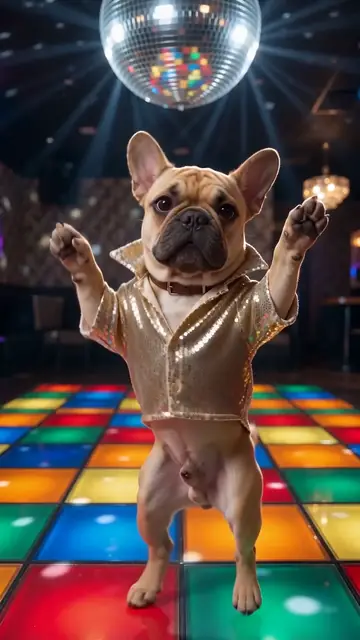
| 🪩 Disco | Light-up 70s dance floor and a mirror ball | The disco point, hip sways, the hustle | Funky disco groove |
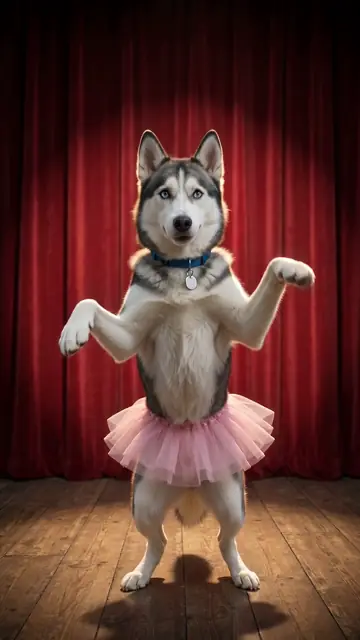
| 🩰 Ballet | Theatre stage, red curtain, pink tutu | Tiptoes, a pirouette and a deep bow | Gentle piano and strings waltz |
| 💃 Salsa | Latin club with string lights | Salsa basics, hip swings and a twirl | Trumpets, congas and cowbell |
Not sure? Hip-hop and Disco are the safest picks for big, funny moves. Ballet is the funniest with large, serious-looking dogs. See all dance styles.
Step 4: pay once
You see the price before you pay. Checkout runs on Stripe, so Apple Pay, Google Pay and cards all work, and we never see your card number. There is no subscription and nothing renews.
Step 5: wait 3 to 5 minutes
Behind the scenes, two AI models work in a row. First, an image model puts your exact dog into the dance scene, standing up in a dance pose. Then a video model animates that picture into a 10-second dance with music. You see a progress bar while it works.
Step 6: download and post
Tap Download to save the MP4. On a phone you can also tap Share to send it straight to TikTok, Instagram or WhatsApp. The video is already 9:16, so it fills the screen with no black bars. Tips for posting are in how to post your dancing dog video.
Common mistakes
- A cropped head-shot. Fine for a profile picture, weak for a full-body dance.
- Heavy filters. Beauty filters change the fur colour and the eyes.
- A tiny dog far away. Crop the photo so your dog fills most of it.
Make your own dancing dog video
One photo, five dance styles, one-time payment from $4.99. Ready in about 4 minutes.
Upload your dog's photoQuestions and answers
Can I make my dog dance with AI for free?
Some apps offer a free try with a watermark or a low resolution. Our videos are paid (from $4.99), with no watermark, in HD, made from your own photo. See the free vs paid comparison.
Do I need to film my dog?
No. One still photo is enough. The AI creates all the motion.
Can I choose the song?
Each style comes with its own original music. To use a trending sound, add it inside TikTok or Reels when you post.
How many photos do I need?
One. More photos do not help, one sharp full-body photo does.
More guides
- Is the dancing dog video real?Most of the smooth, on-beat dancing dogs in your feed are AI. Six quick ways to tell.
- AI dog dance stylesHip-hop, Viral TikTok, Disco, Ballet or Salsa. What each style looks like, and which dogs suit it.
- Dancing cat AI: make any pet danceCats, rabbits, guinea pigs, ferrets. Any pet can dance. What works best for each.
- Free vs paid AI dancing dog videosWatermarks, resolution, queues and likeness. An honest look at what "free" usually means.
- The best photo for an AI dancing dog videoEight quick tips that make your dog look like your dog. Full body, daylight, eye level.
- Dog dance trends and video ideasIdeas that work on TikTok and Reels: reveals, birthdays, duets and "my dog if he could dance".